Debugging Strange CALayers in ChatGPT
Update (Jan 3, 2026): After this post was published, engineers from OpenAI reached out with important clarifications. The post has been updated to reflect their findings, including confirmation of a SwiftUI framework bug that Apple has since fixed in macOS 26.2.
I opened up the ChatGPT app on my Mac this morning, and noticed something strange: the contents of the update notification was rendering upside-down.
This wasn't the first time. Users have been reporting similar bugs in the official ChatGPT Mac app for a long time:
Not sure if this is just a bug or a #StrangerThings Easter egg, but @ChatGPT's macOS app just went full Upside Down on me. 😅
— Thomas Mirnig (@ThomasMirnig)
A notable characteristic of this bug is that it happens intermittently. Every now and then, certain strips of text in the chat bar or in a notification would display upside down. Not flipped positioning, but rather each individual label rendering as inverted. Only some elements were affected, while other views and buttons rendered fine.
Since I had the bug in front of me, I figured I might as well take a stab at fixing it.
Attaching the Debugger
I attached LLDB to the running ChatGPT process and poked at the problematic CALayer. The upside-down text was rendered by a SwiftUI internal layer class called CGDrawingLayer.
(lldb) po (BOOL)[(CALayer*)0x98b357360 isGeometryFlipped]
NO

(lldb) po (BOOL)[[(CALayer*)0x98b357360 superlayer] isGeometryFlipped]
YES
The layer hierarchy looked correct: parent flipped, child unflipped, which is standard for AppKit.
Unlike iOS where all views use a top-left origin, AppKit's default coordinate system has its origin at the bottom-left, with Y increasing upward. Views can override isFlipped to return YES for a top-left origin instead. When a view is layer-backed, AppKit needs to reconcile these coordinate systems with Core Animation, which always uses bottom-left origin.
AppKit handles this by setting each layer's geometryFlipped property based on whether the view's coordinate system differs from its ancestor's. I used Hopper to disassemble AppKit's _updateLayerGeometryFromView and found the calculation:
geometryFlipped = self.isFlipped XOR ancestor.isFlipped
So YES XOR YES = NO. The math checked out.
So given that, I'd expect this to quickly fix the problem:
(lldb) expr [(CALayer*)0x98b357360 setNeedsDisplay]
(lldb) expr [(CALayer*)0x98b357360 displayIfNeeded]
The text rendered correctly. Forcing a redraw fixed it. This told me the layer configuration was fine now. The problem was in the initial draw.
I dug deeper and found something strange. The view hierarchy was fully connected:
(lldb) expr -l objc -O -- [[[[(CALayer*)0x8fba682a0 superlayer] delegate] superview] superview]
<AppKitPlatformViewHost: 0x8fb51c000>  ✓
But the layer hierarchy was not:
(lldb) expr -l objc -O -- [[(CALayer*)0x8fba682a0 superlayer] superlayer]
nil  ← BUG!
This was the clue. When you call addSubview(), the view's superview is set immediately. But the backing layer tree is still in flux during the transaction. If a layer is displayed before its ancestor chain has fully settled, you have a race condition.
In a properly connected hierarchy, an NSHostingView (flipped) inside another flipped view yields YES XOR YES = NO. The child layer doesn't need its own flip since the parent already handles it. Core Animation then uses this to set up the CGContext CTM (current transformation matrix) when drawing.
But when superlayer.superlayer is nil, there's no ancestor to XOR against. The calculation falls back to just the view's own flip state, producing the wrong geometryFlipped value. This propagates to the CTM:
Connected hierarchy:
┌─────────────────────────────────┐
│ superlayer.superlayer (flipped) │
│  └─ superlayer (flipped)        │  → YES XOR YES = NO
│      └─ CGDrawingLayer          │  → geometryFlipped = NO ✓
└─────────────────────────────────┘  → CTM d = +2 (correct)

Disconnected hierarchy:
┌─────────────────────────────────┐
│ superlayer.superlayer = nil     │
│  └─ superlayer (flipped)        │  → YES XOR ??? = ???
│      └─ CGDrawingLayer          │  → geometryFlipped = wrong
└─────────────────────────────────┘  → CTM d = -2 (upside-down)
The d component of the CTM controls Y-axis scaling. A positive value means Y increases upward (standard for text). A negative value inverts the Y-axis, rendering every glyph upside-down.
Finding the Pattern
With the core issue identified, I was still pretty far from identifying the root cause. Debugging a compiled app where the bug only happens intermittently is tedious. Fortunately, Stephan Casas (OpenAI) had posted a repo reproducing this exact issue. This was a personal project from 2023, before he joined OpenAI, and is unrelated to ChatGPT's codebase. The repo demonstrates embedding SwiftUI views inside an NSTextField using NSTextAttachmentCell, and exhibits the same intermittent upside-down rendering.
This gave me a minimal reproduction to work with, rather than poking at ChatGPT's binary.
The Smoking Gun
I needed to catch the exact moment things went wrong. I added a swizzle for CALayer.display that logged the layer hierarchy state at first display:
@objc func swizzled_display() {
    let className = String(cString: object_getClassName(self))

    if className.contains("CGDrawingLayer") && self.contents == nil {
        let grandparentExists = (self.superlayer?.superlayer != nil)

        NSLog("CGDrawingLayer FIRST DISPLAY [%@]", grandparentExists ? "OK" : "BAD")

        if !grandparentExists {
            NSLog("🚨 LAYER HIERARCHY NOT CONNECTED!")
            NSLog("   superlayer.superlayer is nil")
        }
    }
    self.swizzled_display()  // call original
}
On a bad launch, the logs confirmed my suspicion:
CGDrawingLayer FIRST DISPLAY [BAD]
🚨 LAYER HIERARCHY NOT CONNECTED!
   superlayer.superlayer is nil
The layer was being displayed before its ancestor chain was connected.
The Code Smell
Looking at the repro code more carefully, I found two patterns that led to the bug:
1. Mutating attributedStringValue during draw()
override func draw(_ dirtyRect: NSRect) {
    self.reformatAttributedString(forRect: dirtyRect)  // Mutation!
    super.draw(dirtyRect)
}
This triggered text system relayout during the draw pass.
2. Calling addSubview from NSTextAttachmentCell.draw()
The cell's draw(withFrame:in:) method was adding the hosting view to the view hierarchy. This method is meant for drawing content into a graphics context, not for managing view hierarchies.
Together, these created a cascade:
draw()mutatesattributedStringValue- Text system relayouts
HostingCell.draw()gets calledaddSubview()is called- SwiftUI creates new
CGDrawingLayers CA::Transaction::commit()triggers display- Display runs before layer hierarchy is connected
- Wrong CTM → upside-down text
Validating the Theory
I extended the swizzle to log more details and compared good vs bad launches:
Good launch:
CGDrawingLayer FIRST DISPLAY [OK]
  gp_exists=1  superlayer.flip=1
  Layer addresses: 0x89e0dd6c0, 0x89e0dd650, 0x89e0dd5e0
Bad launch:
CGDrawingLayer FIRST DISPLAY [BAD]
  gp_exists=0  superlayer.flip=0
  Layer addresses: 0x89e89d730, 0x89e89d7a0, 0x89e89d810
The CTM values confirmed the theory:
- Good:
d = +2(unflipped, correct for text) - Bad:
d = -2(flipped, text renders upside-down)
I also found a natural 100% repro: make the window small enough to cause text truncation, close the app, and relaunch. The truncation forces complex layout recalculation during the initial draw, widening the race window.
The Quick Workaround
My first fix was to defer addSubview using CATransaction.setCompletionBlock:
override func draw(withFrame cellFrame: NSRect, in controlView: NSView?) {
    let frame = cellFrame

    CATransaction.setCompletionBlock { [weak self] in
        guard let self = self, self.contentHost.superview == nil else { return }
        controlView.addSubview(self.contentHost)
        self.contentHost.frame = frame
    }
}
This worked. By the time the completion block ran, the layer hierarchy was connected. But this is ultimately a hacky solution, since I was still triggering view hierarchy changes from a draw() context, it was just happening later.
The Proper Fix
The practical problem with NSTextAttachmentCell is that it only gives you a concrete frame in draw(withFrame:in:). If you want to host a live view (not just draw into a context), you end up managing that view from within the draw callback—exactly where you don't want to mutate hierarchies.
NSTextAttachmentViewProvider (macOS 12+) solves this by design. Its loadView() method is called as part of layout and view resolution, not from the drawing callback:
class HostingAttachmentViewProvider<Content: View>: NSTextAttachmentViewProvider {
    private let contentBuilder: () -> Content

    override func loadView() {
        // TextKit calls this and handles addSubview for us
        self.view = NSHostingView(rootView: contentBuilder())
    }
}

class HostingAttachment<Content: View>: NSTextAttachment {
    override func viewProvider(
        for parentView: NSView?,
        location: NSTextLocation,
        textContainer: NSTextContainer?
    ) -> NSTextAttachmentViewProvider? {
        return HostingAttachmentViewProvider(...)
    }
}
With this approach:
- No manual
addSubview()- TextKit handles view insertion - TextKit inserts the view during layout/attachment resolution, avoiding the race condition
- No draw-time mutations
This fix is showcased in the demo below:
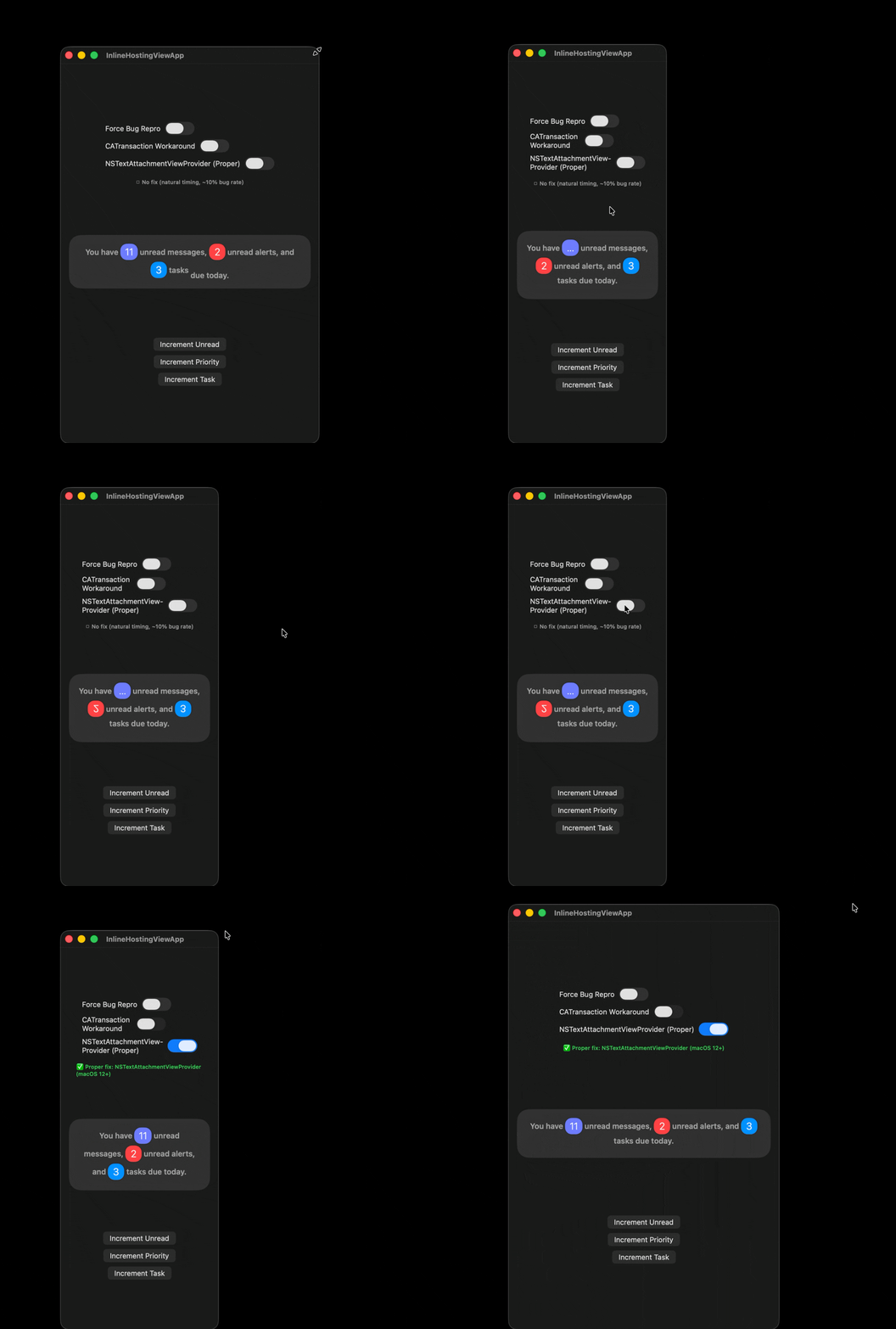
First, I set up a complex (broken) layout, producing a wide race window. I then restart the app, triggering the bug. Switching to the new approach (NSTextAttachmentViewProvider) resolves the bug and layout issues.
Back to ChatGPT
With the reproduction demo solved, I went back to ChatGPT to figure out if this was the exact same bug.
Turns out, ChatGPT behaves quite differently. Setting a symbolic breakpoint on -[NSView addSubview:] and logging backtraces revealed that ChatGPT wasn't using NSTextAttachmentCell at all. There were no addSubview calls happening during draw().
Digging into the binary, I found a component called MarkdownTextBlock—an NSViewRepresentable that wraps an AppKit text view for rendering markdown. Its updateView(_:context:) method calls addSubview() during the constraint update phase, inside CA::Transaction::commit(). This is the same class of problem as the reproduction demo: modifying the view hierarchy at a point where the layer tree hasn't settled.
* frame #0: AppKit`-[NSView addSubview:]
  frame #1: ChatGPT`___lldb_unnamed_symbol106841 + 852
  frame #2: ChatGPT`___lldb_unnamed_symbol106825 + 704
  frame #3: ChatGPT`MarkdownTextBlock.updateView(_:context:) + 924
  frame #4: SwiftUI`PlatformViewRepresentableAdaptor.updateViewProvider(_:context:)
  ...
  frame #20: SwiftUI`NSHostingView._willUpdateConstraintsForSubtree()
  frame #94: QuartzCore`CA::Transaction::commit()
This gave me a second trigger path:
Path 1: Repro (NSTextAttachmentCell)
draw()
  └─→ addSubview()
        ├─→ view.superview = ✓ (immediate)
        └─→ layer.superlayer.superlayer = nil (not yet attached)
  └─→ displayIfNeeded()
        └─→ 🐛 displays with nil grandparent → wrong CTM
Path 2: MarkdownTextBlock (NSViewRepresentable)
CA::Transaction::commit()
  ├─→ constraint update phase
  │     └─→ updateView()
  │           └─→ addSubview()
  │                 ├─→ view.superview = ✓ (immediate)
  │                 └─→ layer.superlayer.superlayer = nil (not yet attached)
  └─→ display phase
        └─→ 🐛 CGDrawingLayer.display() with wrong CTM
However, the update banner displays via pure SwiftUI, so MarkdownTextBlock doesn't seem to be the trigger I was looking for.
A Third Path
After publication, Stephan Casas from OpenAI reached out with a crucial clarification: the components where users observe this bug use primitive SwiftUI APIs exclusively. Everything is SwiftUI.Text() with no NSAttributedString, NSTextAttachmentCell, or NSViewRepresentable-wrapped AppKit views.
This reveals a third trigger path, and the most concerning one: the race condition can occur in pure SwiftUI, without any anti-patterns on the application side.
The anti-patterns I identified (calling addSubview during draw or layout) are real issues that can trigger this bug. But they're not the root cause in this particular banner issue in ChatGPT. The root cause seems to be coming from SwiftUI's own layer management.
Lessons Learned
This bug has two faces. The anti-patterns I identified (modifying view hierarchies during draw or layout) are real application-level issues that can trigger the race condition. But even with correct code, pure SwiftUI views can exhibit this issue, due to an internal bug that is possibly related to the others noted here.
OpenAI shared their findings with Apple's SwiftUI team, who confirmed the framework-level issue. The bug has been fixed in macOS 26.2.
Practical guidance:
-
View and layer hierarchies connect at different times.
addSubview()updates the view hierarchy immediately, but backing layers are driven by Core Animation transactions. A layer can display before its ancestor chain has fully settled. -
Avoid modifying view hierarchies during draw or layout passes. For
NSTextAttachmentCell, useNSTextAttachmentViewProvider(macOS 12+) instead. ForNSViewRepresentable, create your view hierarchy inmakeNSView(), notupdateNSView(). -
If you hit this bug with pure SwiftUI, there's a workaround. OpenAI's mitigation swizzles
-[CALayer didChangeValueForKey:]and calls-[CALayer setNeedsDisplay]when the key iscontentsAreFlipped. This forces a redraw after the layer hierarchy has settled. It's a runtime band-aid, but effective for older macOS versions.
Code
The demo and fix for the reproduction repository are available in this PR.